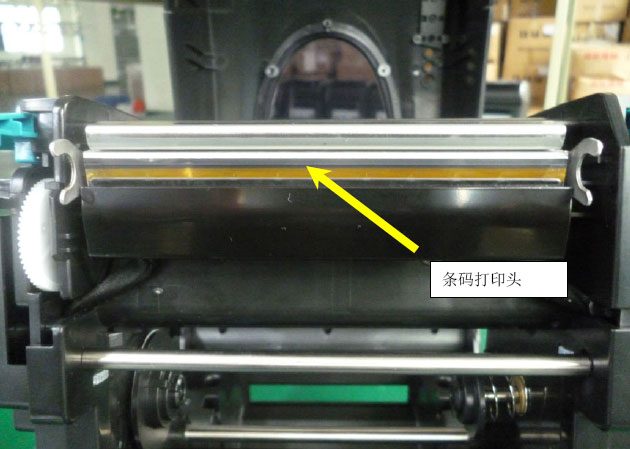
The printhead of a barcode printer is composed of a row of heating elements (thermistors); a common barcode printer printhead has 8 (200 dpi) or 12 (300 dpi) heating elements per 1 mm of length. The heating elements are extremely narrow and are easily damaged by improper use, so barcode printer printheads are consumable parts with a warranty much shorter than that of the whole machine, usually only a few months. A damaged printhead cannot be repaired, only replaced. As one of the core components of a barcode printer, the printhead is relatively expensive, so maintaining and caring for the printhead in daily use is especially important.
To ensure print quality and long-term good performance of the barcode printer, the printhead must be cleaned regularly. The more frequently the barcode printer is used, the more often it should be cleaned. Generally, clean once a week if not frequently used, and once a day if used frequently.
Printhead failures are usually broken lines (missing dots), which are relatively easy to identify. If a straight, fixed blank line appears from top to bottom on the printed label paper and the blank line persists after cleaning the printhead, it can be determined that some heating elements of the printhead are damaged.
How to maintain and care for the printhead in daily use:
1. Use high-quality ribbon; the ribbon should be slightly wider than the label paper (including the liner) to protect the printhead.
2. Use high-quality label paper. If the label paper surface has a lot of dust or impurities, replace it immediately.
3. Desktop barcode printers should avoid working continuously for long periods.
4. Clean the printhead and platen roller frequently according to printing volume (usually once after each roll of ribbon is used up). When cleaning, be sure to turn off the printer power first, then use a medical cotton swab dipped in anhydrous alcohol (purity above 97%) to clean the printhead in one direction; when cleaning the platen roller, rotate it firmly so that the entire roller is cleaned.
5. Never use hard objects or your hands to touch the printhead surface.
6. Before powering on a printer that has not been used for a long time, clean the printhead surface and platen roller first, and it is recommended to replace the existing consumables.
7. Clean dust inside the printer regularly.
8. While ensuring print quality, appropriately lower the printhead temperature and speed in the editing software to help extend printhead life.
9. Users should not disassemble the printhead themselves; if there are problems, please contact a professional dealer or service provider.