Printer Driver Halftone Adjustment Guide
In some application scenarios, to obtain clearer printing results, we need to adjust the driver halftone settings. Adjusting halftone settings works better when printing images (as shown below). The specific settings are as follows:
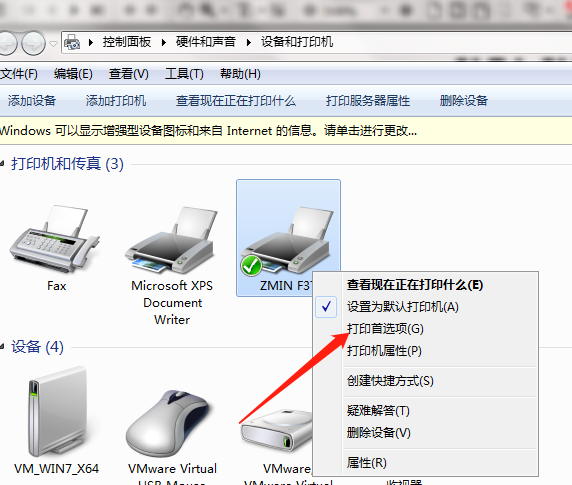
1. Through Control Panel, go to Devices and Printers, right-click the barcode printer driver to be configured, and select "Printing Preferences":
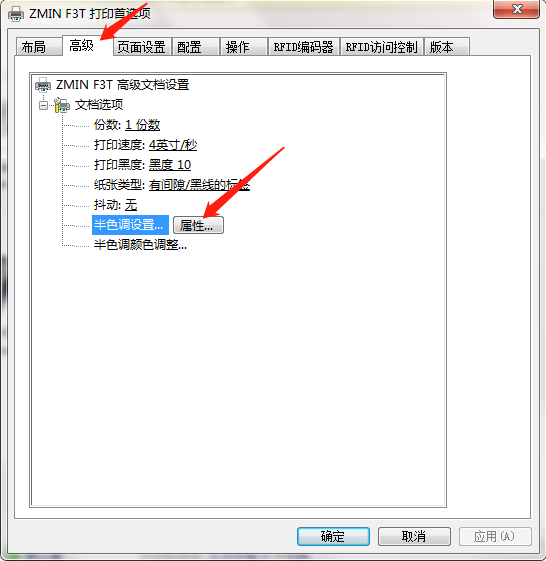
2. Select the "Advanced" tab, and click the "Properties" button to the right of "Halftone Settings" below:
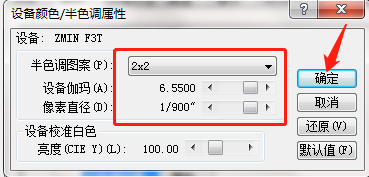
3. Change "Halftone Pattern" to "2x2", drag the "Device Gamma" and "Pixel Diameter" sliders to the far right as shown below, and click "OK":
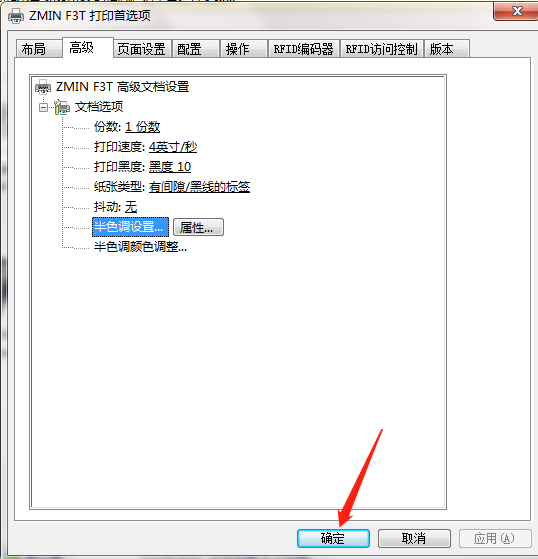
4. Return to "Printing Preferences", click the "Apply" and "OK" buttons in the lower right corner to complete the halftone settings.