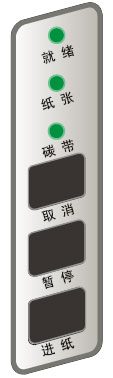
On ZMIN barcode printers, calibrating the paper sensor (media calibration), the self-test and the reset (restore factory defaults) can all be completed using the button panel.
Calibrating the paper sensor (media calibration)
Perform the "Calibrate Paper Sensor" operation in the following two cases so that the printer can position labels accurately (no calibration is needed for continuous paper, such as garment care labels):
- When installed and used for the first time;
- When changing to label paper of a different specification.
Operating steps:
1. With the printer in standby, press and hold the "Feed" button;
2. After about 4 seconds, the three LED indicators will flash simultaneously and the printer will feed paper automatically; release the "Feed" button;
3. When the LED indicators stop flashing and return to their normal steady state, paper sensor calibration is complete.
Self-test
1. Press and hold the "Pause" button for about 4 seconds; the three LED indicators will flash simultaneously; release the "Pause" button;
2. The printer will print the self-test information, and the LED indicators will stop flashing and return to their normal steady state;
3. The following information will be listed in the self-test information:
- Printer model and product number
- Software version information
- Hardware parameter settings and status
- Direct thermal/thermal transfer mode
- Font list
Reset (restore factory default settings)
The following operation resets the printer to factory default settings:
1. In standby, press and hold the "Cancel" button; after about 4 seconds, the three LED indicators will flash simultaneously (if you do not want to perform any operation on the printer at this point, release the "Cancel" button, and after another 4 seconds the printer will automatically return to its normal state);
2. Release and press the "Cancel" button once more;
3. The LED indicators stop flashing and return to their normal steady state, and the reset is complete.
Note: The two parameters "number of labels printed" and "printed length" cannot be reset.