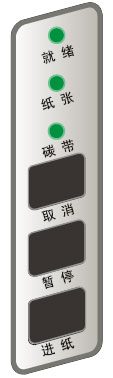
The three LED status indicators on the ZMIN barcode printer's button panel show the printer's operating status.
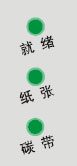
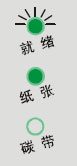
All three indicators steadily lit means the printer is in thermal transfer printing mode and in normal standby, ready to print at any time.
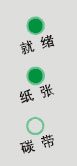
The Ready and Paper indicators steadily lit with the Ribbon indicator off means the printer is in direct thermal printing mode (i.e., printing directly on thermal paper without ribbon), in normal standby, ready to print at any time.
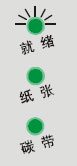
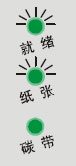
The Ready indicator flashing while the other two indicators are steadily lit indicates the following two situations in thermal transfer printing mode: 1. Printing paused (the Pause button was pressed during printing); 2. Data error;
The Ready indicator flashing while the other two indicators are steadily lit indicates the following two situations in thermal transfer printing mode:
1. Printing paused (the Pause button was pressed during printing);
2. Data error;
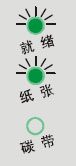
The Ready indicator flashing, the Paper indicator steadily lit and the Ribbon indicator off indicates the following two situations in direct thermal printing mode: 1. Printing paused (the Pause button was pressed during printing); 2. Data error;
The Ready indicator flashing, the Paper indicator steadily lit and the Ribbon indicator off indicates the following two situations in direct thermal printing mode:
1. Printing paused (the Pause button was pressed during printing);
2. Data error;
In thermal transfer mode, "Unable to detect label" generally means the labels are not installed properly, or labels of a different specification were loaded without performing paper sensor calibration (i.e., media detection, also called media calibration)
In direct thermal mode, "Unable to detect label" generally means the labels are not installed properly, or labels of a different specification were loaded without performing paper sensor calibration (i.e., media detection, also called media calibration)
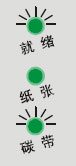
In thermal transfer mode, "Unable to detect ribbon" generally means the ribbon is not installed properly
Entered the button advanced-function response state; this state appears after a reset operation