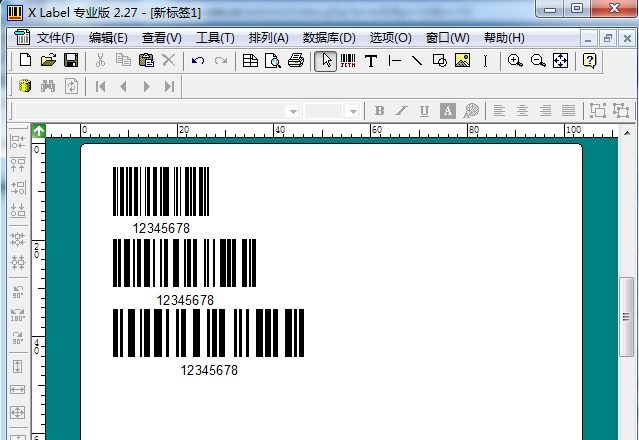
Customers often ask: in barcode editing software, why can't the barcode width be adjusted arbitrarily? Is it a printer problem or a software problem?
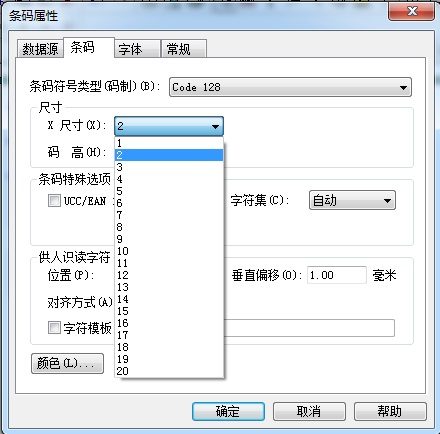
In XLabel software, you can modify the X dimension to change the barcode width proportionally.
Detailed explanation:
A 1D barcode is a pattern of parallel lines formed by black bars (bars for short) and white bars (spaces for short) with greatly different reflectivity; it is a combination of narrow and wide bars and spaces. The narrow bar width is also called the "minimum element width". The narrow bar width is usually determined by the resolution of the printer used (resolution is the number of dots per inch or per millimeter across the printhead's print width). The mil unit is usually used as the unit of "minimum element width" (1 mil = 0.0254 mm). For example, with a 300dpi printer, the "minimum element width" is 0.08 mm; with a 203dpi printer, the "minimum element width" is 0.125 mm.
For barcode editing software, the barcode "minimum element width" also cannot be adjusted continuously; it can only be adjusted dot by dot. What does this mean? Using a 300dpi printer as an example, there are 12 dots/mm, so 1 dot is 0.0833 mm (about 0.08 mm), 2 dots is 0.1666 mm (about 0.17 mm), and 3 dots is 0.2499 mm (about 0.25 mm). Therefore, the barcode "minimum element width" can only be adjusted to sizes such as 0.08 mm, 0.17 mm, 0.25 mm, etc.